Thursday, August 17, 2006

The Truth Mines

In the Truth Mines, though, the tags weren't just references; they included complete statements of the particular definitions, axioms, or theorems the objects represented.

Every tunnel in the Mines was built from the steps of a watertight proof; every theorem, however deeply buried, could be traced back to every one of its assumptions. And to pin down exactly what was meant by 'proof', every field of mathematics used its own collection of formal systems: sets of axioms, definitions, and rules of deduction, along with the specialised vocabulary needed to state theorems and conjectures precisely.*

I came across a cool maths site today (via Good Math, Bad Math). I'd actually been thinking about doing it myself for the last few years, but it always looked a bit too much like hard work (even when I had Copious Free Time), so I never quite got around to it.

It's kind of eerie, though—the proof pages are almost exactly like the ones I'd mocked up and had in my head when I was playing with the project (although less XML/MathML-y). I guess there aren't really that many different ways you could present it, but it does feel like some sort of noodly appendage has sucked the idea right out of my head and served it up as a completed web page (conveniently skipping the tedious business of doing all the work).


* Greg Egan, "Diaspora", 1997

Friday, June 09, 2006

How do I exit thee? Let me count the ways

[reading: Tom Holt, "Alexander at the World's End"]

Today I've been trying to sort out the interactions between the various different mechanisms for generating and catching errors in Windows. With the help of a noddy test program, I ended up with:

Type No handler atexit signal catch (...) set_terminate __except (EXCEPTION_EXECUTE_HANDLER) __except (EXCEPTION_CONTINUE_EXECUTION) SetUnhandledExceptionFilter
exit(0) No message Hit
abort() Visual C++ Runtime Error dialog Hit (SIGABRT)
c=*(char*)0 'Encountered a problem and needs to close' dialog Hit (SIGSEGV) Hit Hit Hit, generates infinite loop Hit
i=1/0 'Encountered a problem and needs to close' dialog Hit Hit Hit, generates infinite loop Hit
raise() No message Hit, execution continues from the raise
throw Visual C++ Runtime Error dialog Hit Hit Hit
RaiseException(0xE0000001,EXCEPTION_NONCONTINUABLE, 0, NULL) 'Encountered a problem and needs to close' dialog Hit Hit Hit Hit
RaiseException(0xE0000001, 0, 0, NULL) 'Encountered a problem and needs to close' dialog Hit Hit Hit, execution continues from the RaiseException Hit

Other key points to note:

  • All catchers only see errors from the same thread, with the exception of the SEH unhandled exception filter set by SetUnhandledExceptionFilter().
  • For (say) a null dereference, the order that various handlers get to see things is:
    • Vectored Exception Handler (VEH)
    • C++ exception handler or Structured Exception Handler (SEH), whichever has the narrower enclosing scope
    • SIGSEGV signal handler /* FALLTHRU */
    • SEH unhandled exception filter installed by SetUnhandledExceptionFilter
    • C++ unhandled exception handler installed by set_terminate
  • I've no idea why a null dereference does appear as a C++ exception in a catch (...) block, but doesn't hit the unhandled-C++-exception-handler installed by set_terminate.

Saturday, June 03, 2006

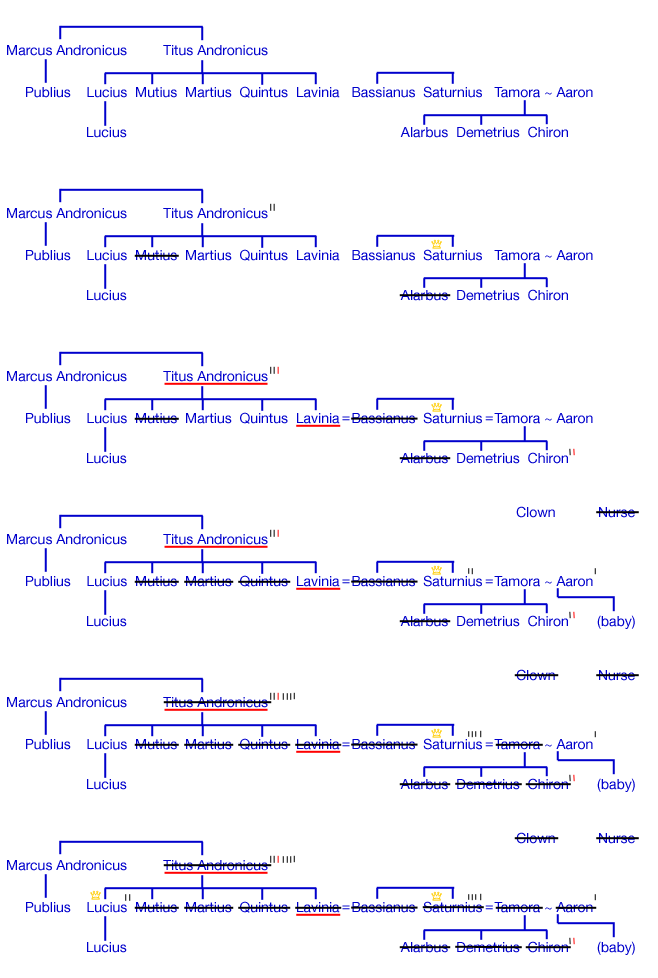
Plenty Of Blood

Finally getting around to booking Titus Andronicus at the Globe, so here's your cut-out-and-keep* guide to Shakespeare's bloodiest play:
Titus Andronicus


*OK, not really.

Monday, April 10, 2006

Day 342

[reading: Dave Sim, "Cerebus"]

[Edit 7-Nov-2007: I've since found a couple of good explanations.]

In my photography course yesterday, I found myself explaining how flash sync speeds work. To my surprise, there doesn't seem to be an easily-googleable explanation online, so I though it might be worth writing up:


The flash sync speed for a camera is the fastest shutter speed you can set and still use flash. It varies from camera to camera: more recent and more expensive cameras are faster, older cameras are slower (and often have the sync speed helpfully marked in red on the speed dial). If you try to use a shutter speed that's faster than the sync speed you end up with pictures like this:

sync

So what goes wrong?

The first thing to understand is how the camera's shutter works. If you could slow down time, you'd see a sequence like this:

60

There are two shutter curtains that pass down the frame from top to bottom. This first opens things up to light, and the second closes it again. As the shutter speed gets faster, we reach a point where the shutter never completely opens during the sequence:

250

Each area of the frame is exposed for the same amount of time (because both shutter curtains move at the same speed), but the top and bottom parts of the frame aren't exposed at the same time.

The second thing to realize is that flash is very fast—much faster than the fastest shutter speed on the camera, maybe 1/16,000 to 1/50,000 of a second. Revisiting our two sequence diagrams:

60flash

At this speed, everything is fine. The flash triggers and illuminates the whole of the image. At the faster speed, problems arise:

250flash

If we think of the flash as being effectively instantaneous, then because there is no moment where the whole of the frame is exposed at once, there's no moment when the flash could fire and illuminate the whole of the scene. This also explains the sort of problems that occur in the final image:

  • Dark bar at the top of the frame (illustrated above): the camera has triggered the flash when the first shutter curtain reaches the bottom of the frame, but the second curtain is already obscuring the top of the image.
  • Dark bar at the bottom of the frame: the camera has triggered the flash when the second shutter curtain is about to start at the top of the frame, but the first curtain has not yet exposed the whole of the bottom of the image.
Model: Bernard T. Bonsai.


And in other news, we've now had our first directors meeting for the new company.

Monday, March 27, 2006

Day 328

A trifle bizarre. After a bunch of investigation, I eventually narrowed down a synchronization problem to the following mini test program:

#include <time.h>
#include <stdio.h>
int main()
{
  time_t tv = time(NULL);
  struct tm *tms = localtime(&tv);
  printf("%02d:%02d:%02d DST:%d\n", 
         tms->tm_hour, tms->tm_min, 
         tms->tm_sec, tms->tm_isdst);
}
When I ran on Mac OS X:
~:date
Mon Mar 27 14:12:29 BST 2006
~:a.out
14:12:30 DST:1
But when I ran on my main Windows XP box:
c:\>time /t
14:13
c:\>localtime.exe
13:13:03 DST:0
Now, I'm usually happy to believe the worst of Microsoft, but it stretches even my credibility to think that their C runtime doesn't get the 1989 ANSI standard right (particularly as a quick web search didn't turn up any complaints).

Investigating further, when I ran the same code on a different Windows XP machine, I get the right answer:

c:\>time /t
14:15
c:\>localtime.exe
14:15:24 DST:0

So I checked MSDN and found some mutterings about "localtime corrects for the local time zone if the user first sets the global environment variable TZ...TZ is a Microsoft extension and not part of the ANSI standard definition of localtime. Note: The target environment should try to determine whether daylight saving time is in effect."

Running echo %TZ% from the command line showed up as GMT. So I tried changing the timezone to EST, but echo %TZ% was still reading GMT. Odd.

Eventually, I discovered that my login had TZ=GMT hard-coded into the environment (Control Panel, System, Advanced, Environment Variables). Not sure how it got that way, but finding it and making it not so has just taken a couple of hours.

[A:35029 B:3218 C:346 D:9187 Total:47780]

Saturday, July 16, 2005

Day 74

[reading: Scott Meyers, "Effective C++ (3rd edn.)"]

I'm reading "Effective C++" again, with the publication of a new edition, and I'm struck by an observation. It's startling how much of the advice in early parts of the book boils down to: Understand how the compiler works. (Items 2, 4, 5, 7, 9, 10, 16 and 17 out of 18 so far)

This is an approach that I've got a lot of sympathy with; I really got to grips with Microsoft Word when I stopped observing the phenomonology of its peculiar behaviour, and instead sat down for half an hour to think about how it might be implemented internally. After that (even though I'm sure I didn't even get close to the true internals), I could cope with and predict the vagaries of the program much more effectively.

However, it does seem to me that one of the points of higher-level computer languages is so that programmers don't have to understand the details of the implementation. I guess if you just memorize the Effective C++ items and forget their explanations, then you can achieve that blissful state of ignorance—but it's safer and better to know the why and the how, which is why Scott's books sell so well.

But this does lead back to my underlying concern: that C++ is too complicated for mere mortal programmers. All of the individual features are there for a good reason, but taken as a whole the language is too big. A top-flight C++ programmer pretty much needs to know the whole of:

That's 1884 pages in total. Even Common Lisp: The Language only weighs in at 971 pages.

I just about trust myself to write C++, but that's only because I know I'll avoid the parts of C++ that I don't understand fully. I've only ever met half a dozen people that I'd completely trust to write C++ (one of them being Scott), which makes for a hard time supporting C++ code.